
U17
The Security tab of the Client editor controls the security configuration options for both users and agents. On the Security tab, you can specify password-related security parameters, and the maximum failed login attempts for the LiveVox Portal (LVP) user and agent. The Subnet IP is one of the fields on the Security tab. The Subnet IP field contains a whitelist of IP addresses that are granted access to LVP. Any IP address that is not listed in the Subnet IP field is denied access. This ensures that LVP access is controlled by the listed IP addresses.
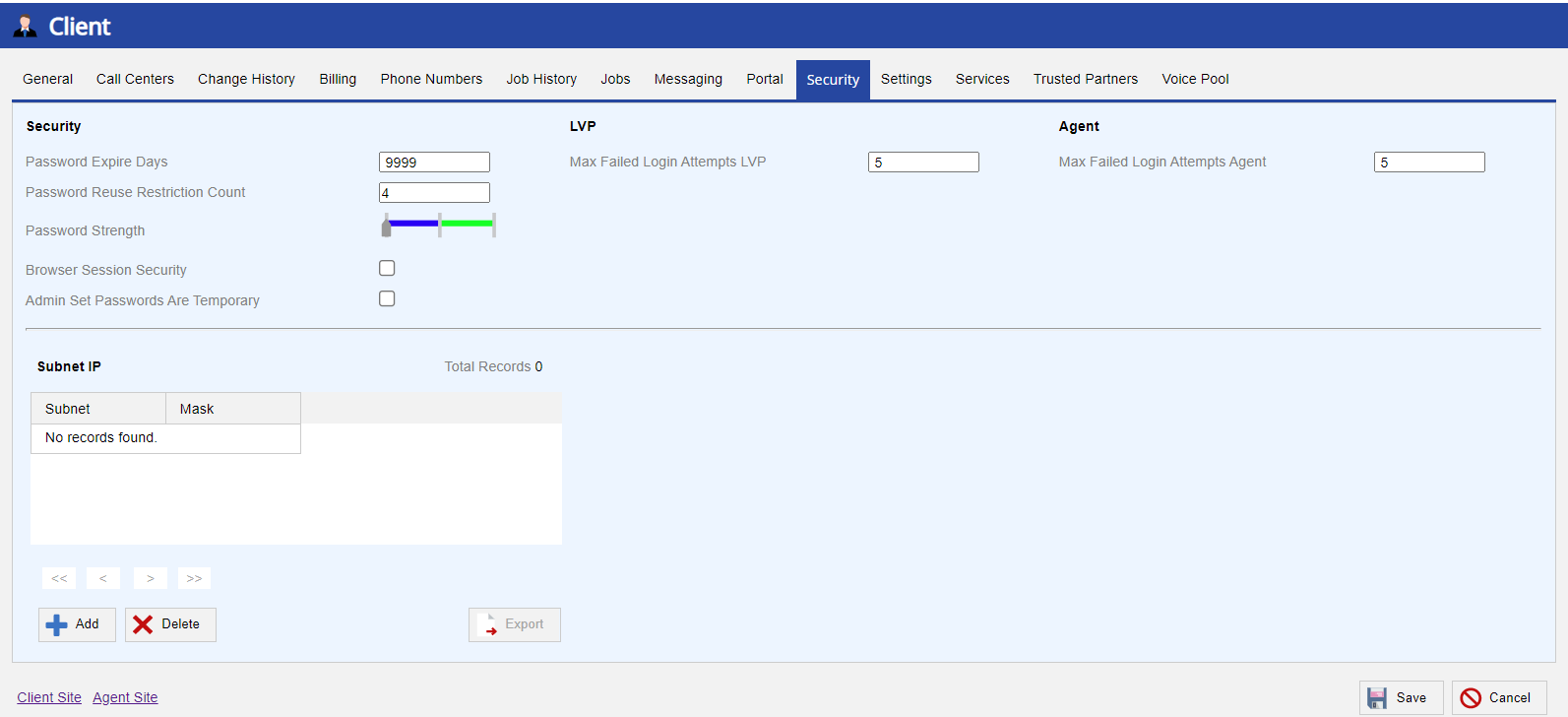
The Subnet IP field controls which IP addresses can access LVP. Permitted users can add or delete IP addresses and also export the list of addresses in .csv format. The accepted input format supports IPv4 addresses such as 192.168.0.1. To add the IP address of an authorized user to the list, specify the subnet IP address and mask in the Subnet IP popup window.

U19 and Fall 23
The Security tab of the Client editor controls the security configuration options for both users and agents. On the Security tab, you can specify password-related security parameters and the maximum failed login attempts for the LiveVox Portal (LVP) user and agent. The Subnet IP is one of the fields on the Security tab. The Subnet IP field contains a whitelist of IP addresses that are granted access to LVP. Any IP address that is not listed in the Subnet IP field is denied access. This ensures that LVP access is controlled by the listed IP addresses.

The Subnet IP field controls which IP addresses can access LVP. Permitted users can add or delete IP addresses and also export the list of addresses in .csv format. The accepted input format supports IPv4 addresses such as 192.168.0.1. To add the IP address of an authorized user to the list, specify the subnet IP address and mask in the Add Subnet IP popup window.

Fall 24
The Security tab of the Client editor controls the security configuration options for both users and agents. On the Security tab, you can specify password-related security parameters, and the maximum failed login attempts for the SmartReach user and agent. The Subnet IP is one of the fields on the Security tab. The Subnet IP field contains a whitelist of IP addresses that are granted access to the platform. Any IP address that is not listed in the Subnet IP field is denied access. This ensures that platform access is controlled by the listed IP addresses.
 The Subnet IP field controls which IP addresses can access SmartReach. Permitted users can add or delete IP addresses and also export the list of addresses in .csv format. The accepted input format supports IPv4 addresses such as 192.168.0.1. To add the IP address of an authorized user to the list, specify the subnet IP address and mask in the Add Subnet IP popup window.
